Showing posts with label CZ Labs. Show all posts

Tuesday, July 9, 2013

What Are the Pros and Cons of Augmented Category 6 (Cat6a) Cabling?


Introduced in 1997, Category6 (or Cat6) networking cable offered significant improvements over its predecessor, the Cat5ecable. It offers data transfer speeds up to twice as fast as a Cat5e and with less attenuation and EMI problems. It is also backward compatible, so even if your equipment is only capable of 10/100 speeds, you can replace all your Cat5e cable with Cat6. You won’t get the benefits of Cat6, but you’ll still be in business. 

2008 brought an improvement to Cat6, with Cat6a, or Augmented Category 6. This standard is defined at frequencies up to 500 MHz which is twice that of its predecessor, the Cat6.

The purpose of Cat6a is to support 10GbE networking, and it is capable of supporting this speed for up to 100 meters. Speed is really the only benefit of Cat6a over Cat6 and Cat5e. (Although a tenfold increase in speed is a huge improvement!)

There are several drawbacks to Cat6a cables including:

Price

Cat6a is a more expensive product, running generally anywhere between 30 to 50 percent more than Cat5e or Cat6. In a large scale renovation, it may be a reasonable choice to go with Cat6a, particularly for large businesses that deal with huge amounts of data and those that would benefit from the enhanced speeds.

Equipment

With enhanced capabilities in cabling comes the necessity to upgrade equipment, thus adding to the overall cost of the upgrade. You could use Cat6a cables, but you’ll never achieve 10GbE with the same old 10/100 or 10/100/1,000 network cards or switches and, desktop network cards with that kind of support are still rather expensive.

Sure the cables will transfer your data, but the data is only going to travel as fast as your slowest piece of equipment. It’s like buying a moped (do they still make mopeds??) and only using the pedals.

Cable Size

Perhaps the biggest drawback of the Category 6a cable is it’s thicker than Cat6, by almost 100 percent. It’s nearly the size of a Coaxial cable. In the case of new construction, or extensive renovation, this isn’t such a big deal, as old cable trays can be replaced or areas where thinner cables were run can be widened. However, if you’re looking to replace old wiring with Cat6a, you may run into trouble due to the cables’ width. 

The cable size also impacts other aspects. The weight of the cable can be a problem when it comes to installing or hanging runs. When cables hang, they stretch, which will degrade the signal. This may require upgrading cable raceways or hanging racks. If this solution is cost prohibitive, the tendency is to use more zip ties. However, this cable is also much more sensitive to damage. Over-tightened zip ties will cause signal reflections, causing the signal to degrade more so in the Cat6a than in earlier standards.

Also, due to size and width, the Cat6a cable has a larger minimum bend radius. Any network cable’s performance will degrade if runs take too sharp a turn. The Cat6a cable is affected even more acutely by tight turns than its predecessor.

Should I Upgrade to Cat6a?

The most important question to ask yourself when considering changing to Cat6a is, “Am I going to need to support 10GbE?” If you run a business with a few hundred employees, then maybe not. A datacenter or an ISP though, may benefit from upgrading their backbone to something capable of these speeds.

At CZ Labs we are always on-hand to answer your questions via live chat or call us at 800-423-2322.

We carry a large lineup of Cat5e and Cat 6 products at wholesale bulk discount pricing. We cater to businesses and IT companies that need bulk quantities. Please do visit our online store for more information and to learn more about our products.

We also invite you to like us on Facebook and add us to your circles on Google+.

Wednesday, July 3, 2013

When Should I Use a Surge Protector?


Surge protectors are so common these days that the term is almost synonymous with “power strip.” A power strip is simply an extension of the outlet on your wall. It is (usually) a short extension cord with multiple outlets built in, allowing us to expand our power outlets. A basic power strip offers no protection against power surges or spikes.

In part one of our blog post on surge protectors, we discussed how these units are a power strip with built in protection against electrical spikes and surges. They allow us to expand our power outlet availability and protect our electronic devices from getting fried.

“When should I use a power strip” is a matter of personal opinion. The better question to ask would be: “What devices do I own that I’d like to protect from power spikes and surges?” Perhaps the only reason to opt for a simple power strip over a surge protector, is money. A simple 6 outlet power strip is usually under $10, whereas a surge protector is generally somewhere between $10 and $20. Also, even one strong power surge, and your surge protector is likely not much protection anymore, which means you’re going to need a new one—hence the importance of buying a quality surge protector.

You probably don’t need to plug your lamp into a surge protector because the worst thing that’s likely to happen to your lamp due to a voltage increase, is a burnt out bulb. There are even those who contend their coffee maker is worth protecting, but to be honest, you may want to think twice about having that many outlets available on the counter next to a 10 or 12 cup pot of water.

Electronics you should have a surge protector for include:

Computers

Your computers and their peripherals (i.e. monitor, speakers, keyboards, web cams, etc.) are filled with electric-sensitive components. Electrical surges are commonplace in the computer world and can cause a host of problems, many of which are difficult to diagnose leading to lost time and money.

Consider what would happen if your computer (or any other components) were damaged by a power surge. Computers are expensive to replace of course, but many times they are also filled with irreplaceable information, pictures, documents, etc. The cost to protect your computer devices is a necessary must-do.

TVs and Other Home Entertainment Components

Most of these devices are equipped to handle small spikes, but with added protection, they will last longer. These electrical devices, like your computers, are not cheap to replace.

With every new design home entertainment products become more accurate and produce higher definition, so the internal components become more and more sensitive to electricity. This is why power surges cause damage far more often now than they did years ago.

Cell Phones & Similar Hand-Held Electronics

Again, these items are costly to replace and sometimes contain irreplaceable data.

Another consideration is that power can be pushed over more than one power cable. Power spikes can be caused by lightning hitting phone cables or cable TV lines, so when choosing a surge protector consider one that has jacks for these cables as well.

CZ Labs offers a large inventory of quality surge protectors at wholesale, bulk pricing to help you protect all of your electronic devices.

As always, we hope you’ll like us on Facebook, follow us on Twitter and check out our Pinterest Boards.

If you have questions about surge protectors or any of the other items we sell, please feel free to contact us at 800-423-2322 or visit our website and take advantage of our live chat support.

Tuesday, July 2, 2013

How Do Surge Protectors Work - Part One


The power that runs through our homes and offices largely goes unnoticed. We plug things in all the time and hardly ever give a thought to the energy that delivers the power we need.

Power is essential at the workplace and in our homes and as time goes by and we obtain even more electrical devices, we find ourselves plugging things in more often and in greater volume. Eventually, we run out of plugs, and find we need more outlets. The easiest way to get the power we need is with a power strip—a simple row of outlets on one strip that is plugged into one electrical outlet.

We all endure power outages and when power goes out and we’re unable to use our beloved devices, it can be aggravating but most of us have come to view it as something that just happens.
However, what happens if power goes in the other direction—power overload? If there is too much power forced through the lines, as in a power spike, what can we do to protect our already plugged-in devices?

The common level of voltage in a home or office space is 120V. Problems start to happen when the voltage rises above 120. When it rises for two nanoseconds or less, the event is called a power spike. Just three nanoseconds or more is called a power surge.

The best analogy for understanding this problem is to think of your electrical wire as a garden hose. To force water out of the nozzle, you turn up the pressure on the other end. This is similar to increasing electrical voltage on one end of a wire. The energy is essentially pushed through the wire just like water is pushed through a hose.

Increasing the water pressure too much will eventually cause the hose to burst. Likewise, if the electrical voltage is increased higher than it should be—electrical components will heat up too much and without proper protection, excessive power bursts cause our devices to fail and can even cause irreparable damage.

Enter the Surge Protector

Power surges and spikes are the most common cause of electronic device failures. This frustrates the end user, especially because the situation could have easily been prevented by a surge protector.

Within the surge protector, is a component called the MOV (Metal Oxide Varistor). This is a piece of metal oxide joined on either end by semiconductors; one end to the hot wire or power feed and the other to the ground. Under normal circumstances, the MOV offers too much resistance for electricity to bother with so our devices continue to function properly.

When the voltage increases beyond its proper levels such as in a power surge or spike, the MOV changes how it operates. The MOV will channel the excess voltage back out of the power strip through the ground wire sparing our electronics. Surge protectors also give us the time we need to turn off devices if severe power bursts are reported.

In the simplest terms, this is how surge protectors work and it’s that MOV that protects our devices. Still, many of us are unsure of when to use surge protectors and on what devices.

CZ Labs hopes you’ll bookmark our blog because in part two of our post, we’ll explain when and how to use surge protectors—so check back on tomorrow, Wednesday, July 3, 2013 to learn more!
We sell many surge protectors at bulk and wholesale pricing for all your home and office needs. 

We also hope you’ll like us on Facebook, follow us on Twitter and add us to your Google+ circles as we continue to bring you informative posts on cables, connectors—and surge protectors.

Thursday, June 27, 2013

What Are Component Video Cables and How Do They Work?


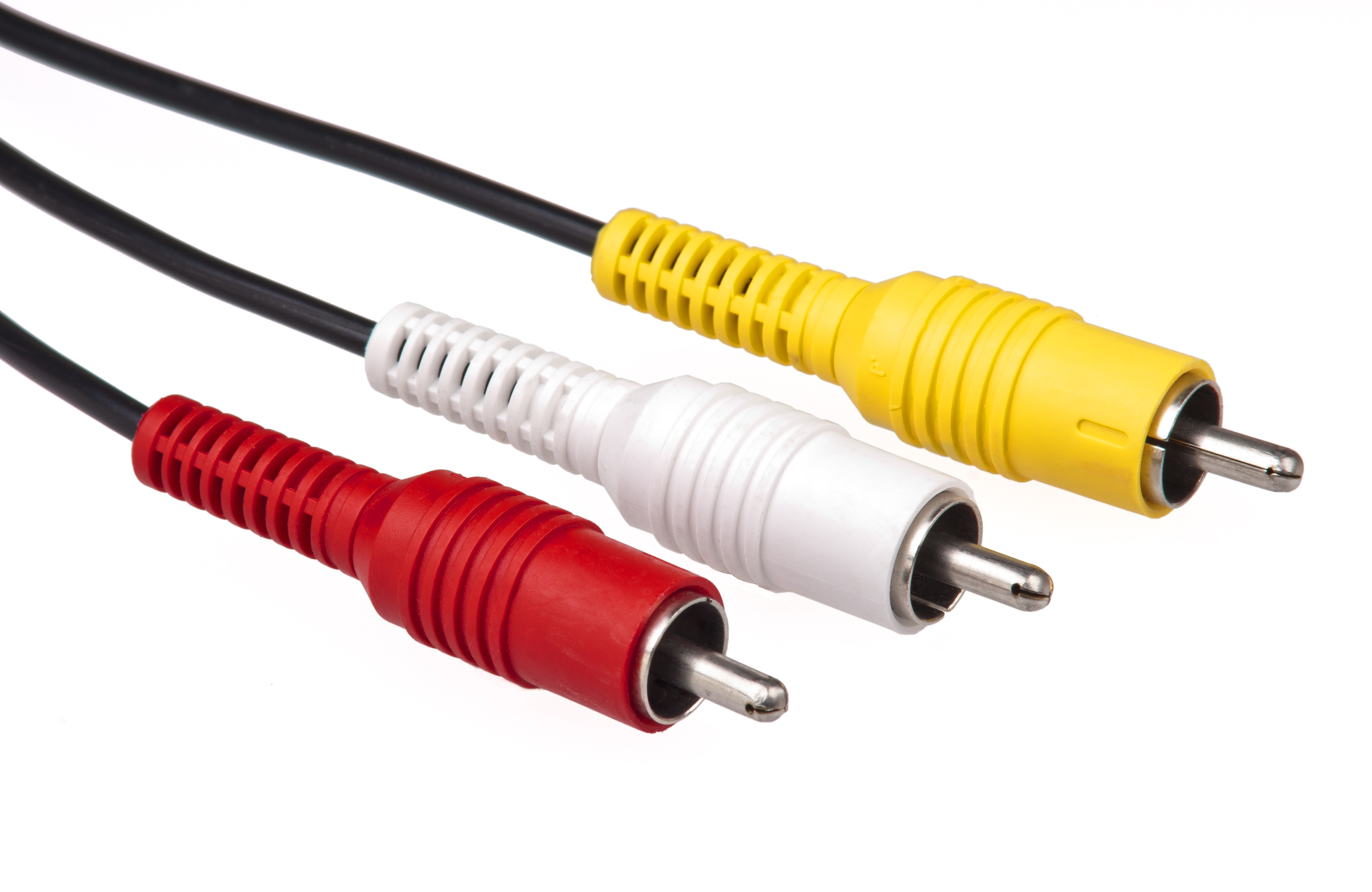
The red, yellow and white cables we connect to our televisions to watch our DVDs were so common over the last decade that the likelihood of an adult reading this blog post having never seen them, is slim. This connection, called RCA or composite, carry both video and audio over those three wires, the yellow being video and the red and white, audio. 

Taking the yellow cable a step further, Component video breaks down the signal the RCA cables use for the one yellow wire for into three separate elements. The Y signal controls brightness and contrast, C controls red and blue colors, and green colors are extrapolated when all three signals are read. Thus, this is sometimes known as Red, Green, Blue or an RGB interface. 

Like the RCA and S video, Component video is analog. Analog video is capable of only 480i. That’s 720x480 interlaced @ 59.94 Hertz (NTSC) or 720x576 interlaced @ 50 Hertz (PAL).

Depending on your TV and assorted equipment such as a Blu-ray player and the quality of your Component cable, Component can technically reach 1080p but there are few players that support it due to copy protection. Thus, Component is generally limited to 720p or 1080i.

What’s Better HDMI or Component?

Equipment is a big factor. Even if your cables are of the highest quality, some televisions support higher image resolution via Component, where others don’t even have a Component input. Some other devices such as Blu-ray players may have Component outputs, but might not support the high resolution pictures.

Other factors that could contribute to analog signal interferences include, but are not limited to, Electro Magnetic Interference (EMI) that are signals from other devices like power cords or magnets in speakers. You can, however, purchase surge protectors that reduce EMI noise such as the one seen below.

Under even the most perfect circumstances, you might find that your Blu-ray player looks better over a Component connection than it does over HDMI. You may find that your cable television looks far better over HDMI than Component.

Still, there are some analog purists who contend that analog is better than digital—but this is an opinion of choice. Analog vs. digital is much like the argument of which is better: Vinyl records or CDs and their ability to capture the exact sounds originally recorded in a recording studio.

Something else to consider when selecting a cable to carry your signal is convenience. Component Video has three cables that deliver an analog video signal—and it ONLY does video. You will still need to figure something out for your audio. HDMI is one cable that handles high definition digital video AND digital audio, saving time running and plugging in wires.

CZ Labs offers component cables and HDMI connectors—we are your one stop business, especially if you’re looking to buy in bulk at wholesale prices.

We hope you’ll like us on Facebook, add us to your Google+ circles and follow us on Twitter.

Monday, June 10, 2013

Top 5 Cable Tips for a Network Engineer


Wires pervade our entire lives, and have for many years, so much so, that we sometimes forget that they are more than just a black line running along the floor. Under that plastic coating there are delicate wires that must be treated with respect, especially if you expect to get the highest possible performance out of them. 

Here are five important tips that are easily overlooked when dealing with network cabling.

Never Tug on the Cable

When you’re threading your cable under the desk, around the file cabinet or through the little hole in the back of the desk, it’s easy for it to get caught on something and the urge is always to give a little tug. This is one of the worst things you can do. Kinking your network cable is going to impede the flow of signal through the copper, much like water through a kinked hose.

Connectivity problems caused by something as small as a damaged network cable are sometimes difficult to diagnose. As cables are usually hidden, tugging on them may cause damage and will have you scratching your head wondering what’s wrong with your server or why your Internet carrier isn’t providing you the speeds they said they would.

Go as Short as You Comfortably Can

This is more a rule of thumb. A longer network cable will likely work just fine, especially if it’s a high quality cable. However, signal does degrade and the longer the cable, the more signal loss you’ll experience.

Invest in quality cables to avoid potential problems.

Do Not Let Your Network Cables Hang

Sometimes the best place for a computer isn’t the most convenient, especially as we try to conserve money. It’s frequently a tempting idea to run cables up and over our heads and drop down right at the computer location.

The problem with this is gravity. Over time, a hanging network cable will stretch and stress on the wires inside will lead to poor or no signal. Again, you’ll suspect your computer or drivers at first only to find you’ve wasted time diagnosing something that could have been avoided.

Network Cables Should Be Separated From Power Cables

Network cables may be covered in plastic; however, it is copper that passes the signal. The same is usually true for power cables, but the load they carry is far different. Power cables emit “noise” which will get picked up by network cables and will interfere with your network connection signal. 

It’s best if you keep as much distance as possible between the two.

Be Gentle When Anchoring Your Cables

It may satisfy the neat freak in you to pull your cables taut and use staples or zip ties to keep cables tight to the wall, but if done too zealously this will kink the copper inside and your signal will degrade. It’s okay to be tidy, but be gentle. Staples and zip ties should be loose enough that the cable can still slide through without a problem.

CZ Labs has all the computer and network cables you need. We hope you’ll bookmark our blog or sign up via email to receive our latest posts. Since 1959, we have been supplying our distributors with quality connectors and cables at the lowest possible prices.

We invite you to like us on Facebook and follow us on Twitter. Bulk shipments are our specialty so call us at 1-800-423-2322 and let us talk cables and connectors—wholesale style! We are the B2B "connector" business you seek!